
Connect. Configure. Take Control.
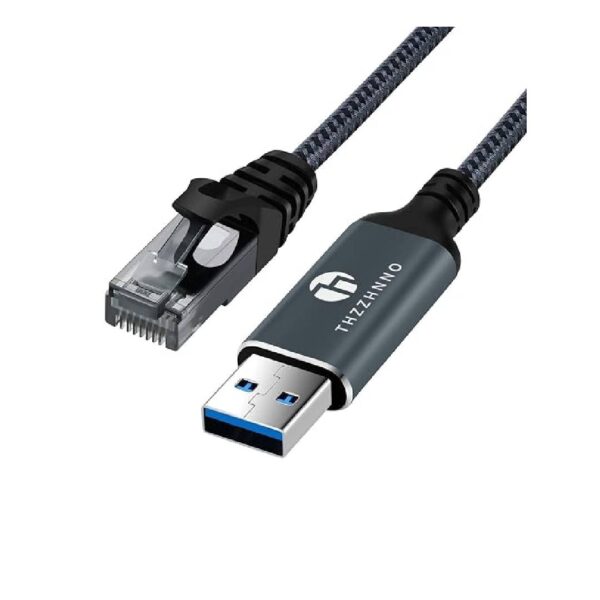
The UGREEN CM204 USB-A to RJ45 Console Cable is designed for IT professionals and network administrators who need to configure, manage, and troubleshoot networking equipment. With a USB-A connector on one end and an RJ45 console connector on the other, it connects a compatible computer directly to the console port of routers, switches, and other network devices. Its 1.5-metre length offers convenient reach for desktop and rack installations, while the built-in USB-to-serial chipset supports reliable console communication.
Key Features
Connect. Configure. Take Control!
Simplify network setup and troubleshooting with a dedicated console cable built for everyday IT management.
3. Five Key Features
Direct USB-A to RJ45 Console Connection
Connect a compatible computer to the console port of supported routers, switches, and other networking equipment without requiring a traditional serial port.
Reliable Network Device Management
Access console interfaces to configure equipment, troubleshoot connection issues, and manage network devices during installation and maintenance.
Built-In USB-to-Serial Chipset
The integrated chipset enables serial communication between your computer and compatible console-enabled equipment, supporting dependable configuration tasks.
Convenient 1.5-Metre Length
The 1.5m cable provides practical reach for connecting a laptop or desktop computer to networking equipment on a desk or in a rack.
Broad Operating System Compatibility
Designed for use with compatible Windows, macOS, and Linux systems. Console terminal software, such as PuTTY or Tera Term, may be needed to access and manage the connected device
What’s in the Box
- – 1 × UGREEN CM204 USB-A to RJ45 Console Cable (1.5m)
FAQS
What is the UGREEN CM204 used for?
It connects a computer to the console port of compatible routers, switches, and other networking equipment for configuration and troubleshooting.
Is this a regular Ethernet cable?
No. It is a console cable for device management, not a standard Ethernet cable for network or internet connectivity.
Which devices are compatible with this cable?
It supports compatible console interfaces on networking equipment from brands such as Cisco, Huawei, Juniper, and MikroTik.
Which operating systems does it support?
It is designed to work with compatible Windows, macOS, and Linux systems.
Do I need special software to use it?
You may need terminal software such as PuTTY or Tera Term to access the console interface of your networking device.

Reviews
There are no reviews yet.