
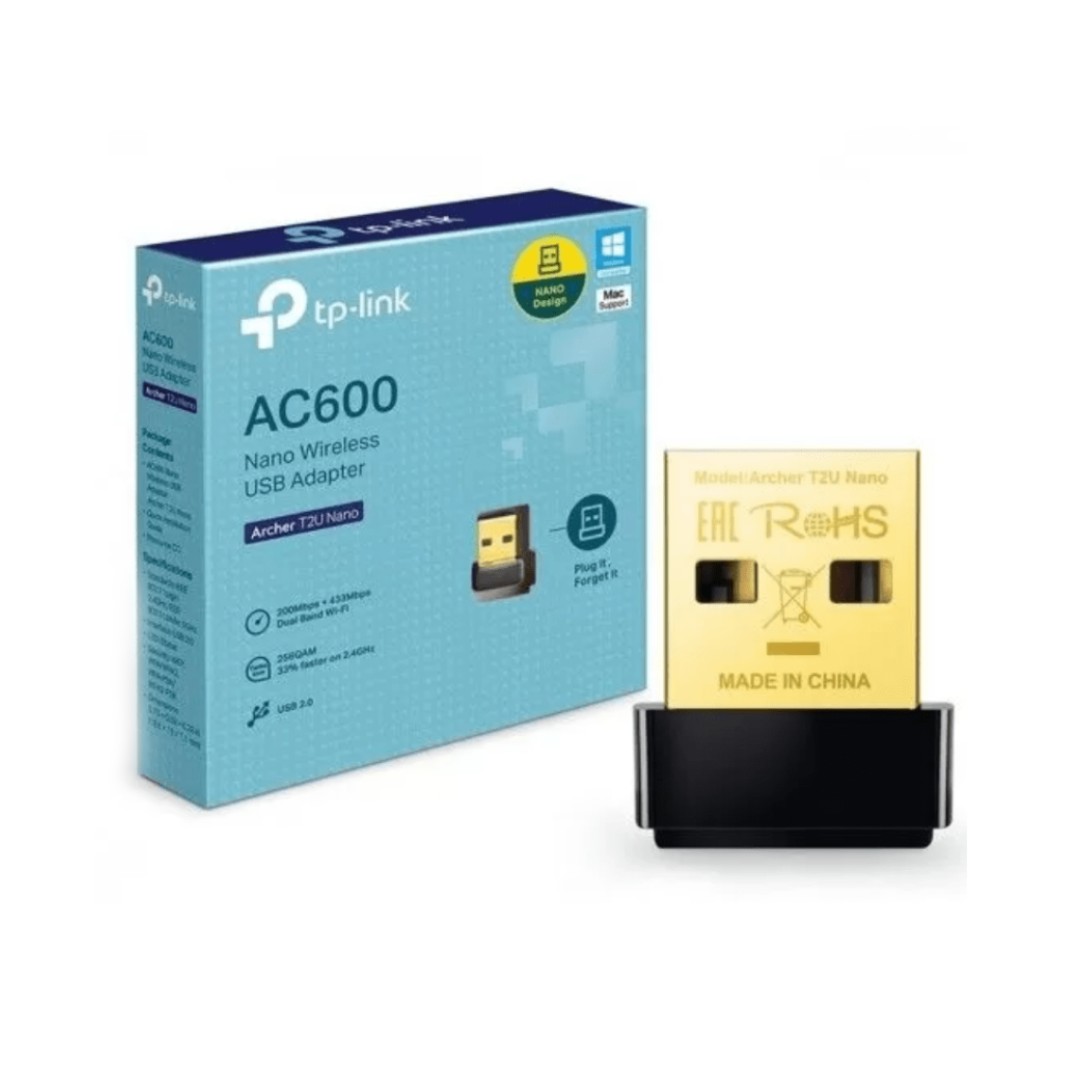
The TP-Link AC600 Nano Wireless USB Adapter (Archer T2U Nano) is a tiny, ultra-compact dual-band Wi-Fi dongle that upgrades desktops, laptops, or older PCs to modern AC Wi-Fi speeds of up to 600Mbps total—delivering 200Mbps on the 2.4GHz band (boosted by 256QAM technology for 33% faster performance than standard 150Mbps N adapters) and 433Mbps on the less-crowded 5GHz band for smoother HD streaming, lag-free online gaming, video calls, and large file downloads. Its nano-sized design (just 15 × 7.1 × 18.6 mm) plugs discreetly into a USB 2.0 port and can stay connected permanently without obstructing adjacent ports or protruding awkwardly, making it ideal for travel, HTPCs, or space-constrained setups.
It supports dual-band connectivity to pair with the latest routers for better range and reduced interference—use 2.4GHz for everyday browsing and compatibility with legacy devices, or 5GHz for high-bandwidth tasks—while maintaining backward compatibility with 802.11a/b/g/n networks. Security features include WPA/WPA2-PSK encryption (plus WEP and 802.1x support), and installation is straightforward with plug-and-play drivers for Windows 11/10/8.1/8/7/XP and macOS up to 10.15 (or earlier versions), often requiring only the included resource CD or quick download from TP-Link’s site—no external antennas or power adapters needed. This affordable, reliable adapter is a popular choice for adding fast, stable wireless to non-Wi-Fi devices or replacing outdated built-in cards, though real-world speeds depend on router distance, interference, walls, and environmental factors.
Key Features
High-Speed Dual-Band Wi-Fi
This adapter delivers combined speeds of up to 600Mbps across dual bands, with 200Mbps on the 2.4GHz band enhanced by 256QAM technology for 33% faster performance than standard N adapters, and 433Mbps on the 5GHz band. This setup provides smoother HD video streaming, lag-free online gaming, and efficient large file transfers while reducing interference on the less-crowded 5GHz frequency.
Ultra-Compact Nano Design
Measuring just around 18.6 × 15 × 7.1 mm, the Archer T2U Nano features an extremely small, unobtrusive form factor that plugs discreetly into any USB 2.0 port. It can remain connected permanently without blocking adjacent ports or protruding awkwardly, making it perfect for laptops, desktops, HTPCs, or travel use where space and aesthetics matter.
Flexible Dual-Band Connectivity
It supports both 2.4GHz and 5GHz bands simultaneously, allowing users to connect to modern dual-band routers for optimal performance—choosing 5GHz for high-bandwidth tasks with better range in crowded environments or 2.4GHz for broader compatibility with older devices and extended coverage through walls.
Broad Operating System Compatibility
The adapter works seamlessly with a wide range of systems, including Windows 11/10/8.1/8/7/XP and macOS up to 10.15 (or earlier versions), often via plug-and-play drivers or simple installation from the included CD or TP-Link’s website. This makes it an easy upgrade for adding modern Wi-Fi to older PCs, desktops, or laptops without complex setup.
Advanced Security Features
It incorporates robust encryption standards such as 64/128-bit WEP, WPA/WPA2, and WPA-PSK/WPA2-PSK to protect your wireless connection from unauthorized access. These security measures ensure safe browsing, file sharing, and online activities when connected to public or home networks.
What’s in the Box
- USB Adapter
- User Manual
FAQs
Why can’t my Archer T2U Nano detect or connect to 5GHz networks?
This is a frequent issue—first, confirm your router broadcasts 5GHz and is on a compatible channel (36–48 recommended; use a Wi-Fi analyzer app to check). Update to the latest Realtek chipset driver from TP-Link’s support page, as older versions may limit 5GHz visibility. In Device Manager, right-click the adapter > Properties > Advanced tab, and look for settings like “Preferred Band” or “802.11n/ac mode” to prioritize 5GHz. Reboot, rescan networks, and test closer to the router. If only 2.4GHz shows, interference, outdated drivers, or router DFS channels could be factors—avoid auto-channel on the router and set a fixed non-DFS 5GHz channel.
Is the Archer T2U Nano compatible with macOS, Linux, or other non-Windows systems?
Official support is strongest for Windows (11/10/8.1/8/7/XP) and macOS up to 10.15 (Catalina) with provided drivers—later macOS versions may need community drivers or built-in Realtek support, but compatibility varies (reinstall after OS updates). For Linux (e.g., Ubuntu), it uses Realtek RTL8811AU chipset—install third-party drivers like rtl8812au/rtl88xxau from GitHub repositories (e.g., aircrack-ng or morrownr forks) via DKMS for better results, though it may require compilation and troubleshooting for detection or 5GHz. Not plug-and-play on all distros; check forums for kernel-specific fixes. Always download from trusted sources to avoid issues.

Reviews
There are no reviews yet.