

Next-level graphics performance. Game on
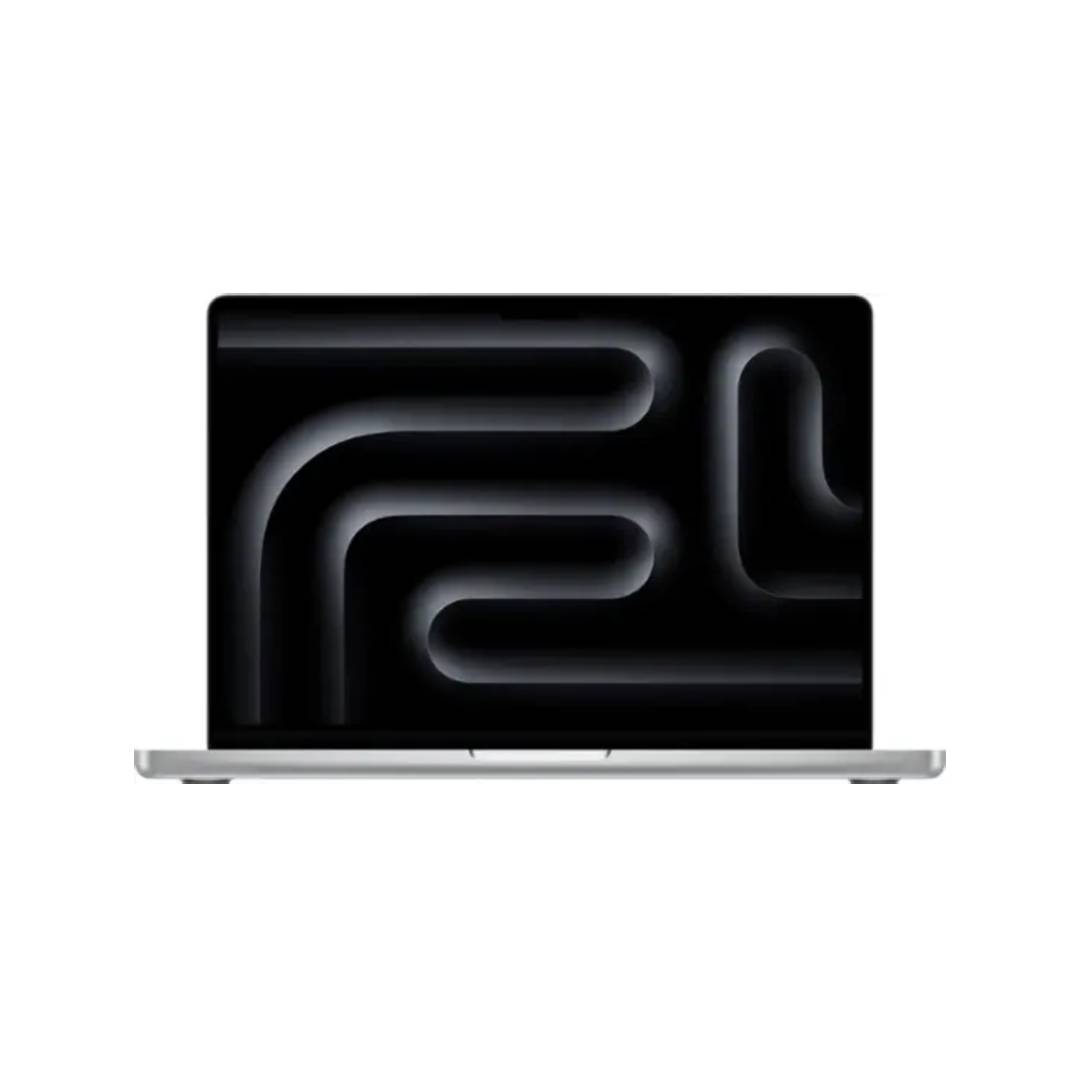
The MacBook Pro 14-inch with M4 Max (2024) is Apple’s most powerful compact professional laptop, delivering desktop-class performance in a portable 14.2-inch form factor. Powered by the M4 Max chip—available in configurations with up to a 16-core CPU (12 performance + 4 efficiency cores), 40-core GPU, and 546GB/s unified memory bandwidth—it excels at intensive workloads like 3D rendering, video editing, machine learning, and complex simulations. It features a stunning Liquid Retina XDR display with up to 1600 nits peak HDR brightness, 1,000,000:1 contrast ratio, and ProMotion adaptive refresh up to 120Hz. Built for Apple Intelligence, it includes enhanced on-device AI capabilities with privacy-focused processing. Connectivity includes three Thunderbolt 5 ports (up to 120Gb/s), HDMI, SDXC card slot, MagSafe 3 charging, and support for up to four external displays. With up to 22 hours of battery life, a six-speaker Spatial Audio system, 12MP Center Stage camera, and options for up to 128GB unified memory and 8TB SSD storage, this model combines exceptional power, efficiency, and all-day versatility for creative pros and power users in a sleek, durable aluminum chassis available in Space Black or Silver.
Key Features
M4 Max Chip Performance
The MacBook Pro 14-inch features the M4 Max chip with up to a 16-core CPU and 40-core GPU, delivering exceptional performance for demanding professional workflows such as video editing, 3D rendering, machine learning, and complex simulations, while maintaining outstanding power efficiency and thermal management in a compact chassis.
Liquid Retina XDR Display
The 14.2-inch Liquid Retina XDR display offers up to 1600 nits peak HDR brightness, 1000 nits sustained full-screen brightness, a 1,000,000:1 contrast ratio, and ProMotion technology with adaptive refresh rates up to 120Hz, providing stunning color accuracy, deep blacks, and smooth motion for creative work and media consumption.
Thunderbolt 5 Connectivity
Equipped with three Thunderbolt 5 ports supporting up to 120Gb/s data transfer speeds, along with HDMI, an SDXC card slot, and MagSafe 3 charging, the laptop enables fast external display support for up to four monitors, rapid file transfers, and versatile peripheral connections without compromising portability.
Extended Battery Life and Audio
With up to 22 hours of battery life on a single charge, the MacBook Pro supports all-day professional use even under heavy workloads. It also includes a six-speaker sound system with Spatial Audio and Dolby Atmos support, delivering immersive, high-fidelity sound for music production, video editing, and entertainment.
Apple Intelligence Integration
Built with powerful on-device AI capabilities through Apple Intelligence, the MacBook Pro enables advanced features like enhanced writing tools, image generation, intelligent photo editing, and privacy-focused machine learning tasks directly on the device, boosting productivity while keeping data secure.
What’s in the Box
- 14-inch MacBook Pro M4 Max
- 96W USB-C Power Adapter
- USB-C to MagSafe 3 Cable (2 m)
- Polishing cloth (only with nano-texture display option)
FAQs
Is the 14-inch MacBook Pro M4 Max worth upgrading to from an M3 Max model?
For most users, the upgrade from M3 Max to M4 Max offers noticeable but not revolutionary gains—typically 15-25% better multi-core CPU performance, improved GPU efficiency, and slightly better power efficiency leading to marginally longer battery life in mixed workloads. However, if your current M3 Max handles your tasks comfortably (e.g., video editing, 3D rendering, or machine learning), many consider waiting for future generations or opting for more RAM/storage instead, as the thermal constraints in the 14-inch chassis limit sustained max performance compared to the 16-inch variant.
How does real-world battery life compare on the 14-inch M4 Max?
Apple rates it up to 22 hours for video playback or web browsing, but real-world usage varies. Light productivity and media consumption often yields 16-20 hours, while demanding tasks like 4K video editing, rendering, or heavy multitasking drop it to 8-12 hours. It generally outperforms previous Max chips in efficiency thanks to the M4 architecture, though sustained high-load scenarios (e.g., Cinebench loops) can reduce it more noticeably in the compact 14-inch form factor due to thermal throttling.
Does the 14-inch M4 Max run hotter or louder than previous generations?
Yes, under heavy sustained loads (e.g., multi-core benchmarks or GPU-intensive rendering), the 14-inch M4 Max can reach higher temperatures and spin fans more aggressively than M3-series models or the larger 16-inch M4 Max, due to the smaller chassis having less thermal headroom and cooling capacity. For typical professional workflows, fans remain quiet or inaudible most of the time, but power users pushing combined CPU/GPU tasks report more noticeable fan noise compared to lighter M4 Pro configurations.
How many external displays can the 14-inch MacBook Pro M4 Max support?
It supports up to four external displays simultaneously: for example, three at up to 6K resolution at 60Hz via Thunderbolt 5 plus one additional at up to 4K/144Hz over HDMI (or various other combinations depending on resolution/refresh rate). This is a step up from prior generations and ideal for multi-monitor setups in productivity or creative environments, with Thunderbolt 5’s 120Gb/s bandwidth enabling fast data transfer and high-res connections without compromise.

Reviews
There are no reviews yet.