
Expand Your Ports
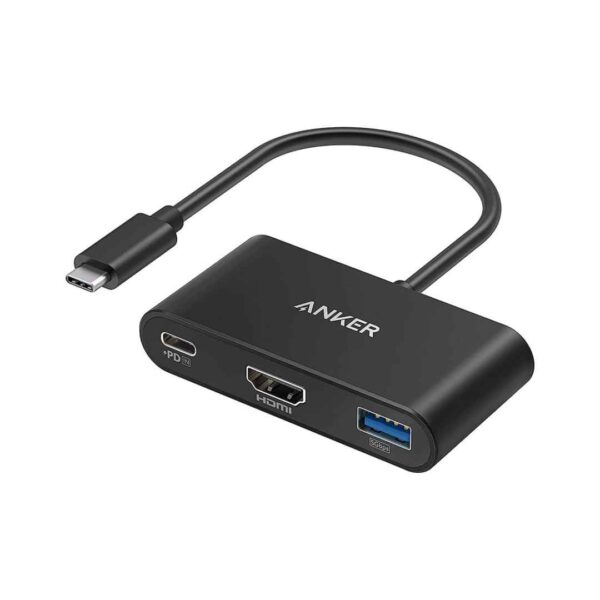
The Anker PowerExpand 3-in-1 USB-C Hub – A8339HA1 is a compact, ultra-portable USB-C adapter designed to expand a single laptop or tablet USB-C port into three essential connections without sacrificing charging capability. It features a USB-C PD input port supporting up to 100W pass-through charging (delivering up to 85W–90W to your device after accounting for hub power needs), allowing you to charge your laptop at near-full speed while using the hub. The HDMI port supports vivid media display at resolutions up to 4K@30Hz for connecting to external monitors, TVs, or projectors, while the USB-A data port provides high-speed file transfer up to 5 Gbps (USB 3.0/USB 3.2 Gen 1 compatible) for connecting flash drives, keyboards, mice, or other peripherals. Its sleek, lightweight aluminum or durable build (often in black or gray, measuring around 75–80 mm long × 38 mm wide × 15 mm thick and weighing ~50–60g) plugs directly into your device’s USB-C port with a short integrated cable or direct connector for minimal bulk, making it ideal for MacBook, Windows laptops, Chromebooks, or tablets with USB-C/Thunderbolt ports. Plug-and-play with no drivers required, it offers broad compatibility across macOS, Windows, ChromeOS, and more (supports DP Alt Mode for HDMI and PD for charging). This hub serves as a simple, reliable solution for presentations, extended workspaces, or travel setups, backed by Anker’s trusted quality and typically an 18-month warranty.
Key Features
100W Power Delivery Pass-Through
This hub supports up to 100W USB-C PD input and passes through up to 85–90W to your connected laptop or device while the hub is in use. It allows simultaneous fast charging and data/ display connectivity without reducing your device’s charging speed significantly.
4K HDMI Video Output
The HDMI port delivers crisp 4K resolution at 30Hz for connecting to external monitors, TVs, or projectors. It extends or mirrors your screen with smooth visuals, making it ideal for presentations, dual-monitor setups, or media viewing on larger displays.
High-Speed USB-A Data Port
A USB 3.0/USB 3.2 Gen 1 USB-A port provides data transfer speeds up to 5 Gbps. This enables quick file transfers with external drives, keyboards, mice, printers, or other USB peripherals without needing additional adapters.
Ultra-Compact and Portable Design
The hub features a slim, lightweight aluminum or durable build that plugs directly into your device’s USB-C port with minimal protrusion. Its small size makes it highly portable for travel, work, or daily use without adding bulk to your setup.
Broad Device Compatibility
It works seamlessly with a wide range of USB-C devices including MacBooks, Windows laptops, Chromebooks, iPads, and tablets that support USB-C DisplayPort Alt Mode and Power Delivery. Plug-and-play functionality requires no drivers or software installation across macOS, Windows, and ChromeOS.
What’s in the Box
- USB-C Hub
FAQs
Does it support 4K at 60Hz on external monitors?
No, the HDMI port is limited to 4K@30Hz (3840×2160 at 30 frames per second). It works perfectly for presentations, movies, productivity, or general extended desktop use, but if you need smoother 60Hz at 4K, you would need a different hub or dock that supports HDMI 2.0 or higher bandwidth (this model uses DisplayPort Alt Mode with lower bandwidth allocation).
How much actual charging power reaches my laptop?
The hub supports up to 100W PD input, but after powering the hub itself (typically 5–15W depending on connected peripherals), it passes through approximately 85–90W to your laptop. Most modern MacBooks, Windows ultrabooks, and Chromebooks that accept 65–100W charging will still charge at near-full speed or very close to it while the hub is in use.
Why does the USB-A port sometimes feel slow or not work with certain devices?
The USB-A port delivers full USB 3.0 speeds (up to 5 Gbps) for data transfer with compatible drives, but some older USB 2.0 devices (e.g., certain mice, keyboards, or cheap flash drives) may fall back to 480 Mbps. It is data-only—no charging through the USB-A port. If a device isn’t recognized, try a different cable or test on another computer to rule out device-specific compatibility issues.

Reviews
There are no reviews yet.