
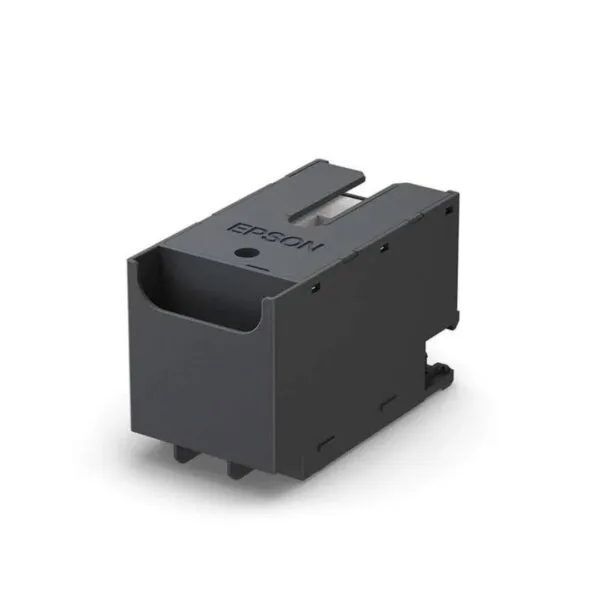
Keep Your Epson Clean, Reliable & Ready to Print!
The Epson T6716 Maintenance Box is a replacement waste-ink collection unit designed for compatible Epson printers. It collects excess ink generated during printing and automatic maintenance cycles, helping keep the printer’s waste-ink system functioning properly and supporting reliable everyday operation.
Key Features
Genuine Epson Maintenance Box
The T6716 is designed as a replacement maintenance box for compatible Epson printers, providing a suitable solution when the existing waste-ink box reaches its capacity.
Efficient Waste-Ink Collection
It collects excess ink produced during printing and maintenance operations, helping prevent waste ink from accumulating inside the printer.
Easy Replacement
The maintenance box is designed to be replaced when the printer indicates that the existing unit is full or requires replacement.
Supports Reliable Printer Operation
Replacing a full maintenance box helps maintain proper waste-ink management and allows the printer to continue operating normally.
Wide Model Compatibility
The T6716 is compatible with selected Epson WorkForce and EcoTank models, including WF-C5290, WF-M5799, C529R, C579R, M5299, M5799, C5710, C5790 and ET-8700.
What’s in the Box
- 1 × Epson T6716 Maintenance Box
FAQS
What is the Epson T6716 Maintenance Box used for?
The T6716 collects waste ink generated during printing and automatic printer maintenance cycles.
When should I replace the T6716?
You should replace it when your compatible Epson printer displays a maintenance-box-full or replacement warning.
Is the T6716 an ink cartridge?
No. The T6716 is a waste-ink maintenance box and is not used to supply ink for printing.
Can I replace the T6716 myself?
Yes. It is a replaceable maintenance component. Follow the replacement instructions provided for your specific Epson printer model.
Which Epson printers are compatible with the T6716?
It is compatible with selected models including WF-C5290, WF-M5799, C529R, C579R, M5299, M5799, C5710, C5790 and ET-8700. Always confirm your exact printer model before purchasing.

Reviews
There are no reviews yet.