
Professional Clarity Anywhere
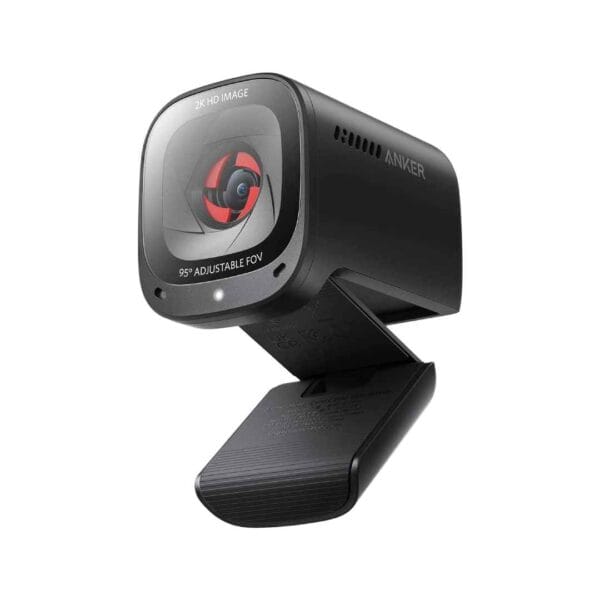
The Anker PowerConf C200 2K Webcam is a compact, budget-friendly powerhouse for seamless video calls and content creation, delivering ultra-clear 2K (2560 x 1440) resolution at 30 fps via its 5MP CMOS sensor for sharp, detailed visuals that outshine standard laptop cams, even in low-light conditions thanks to advanced correction technology that automatically balances exposure and reduces noise for natural skin tones and vibrant colors. Adjustable field of view options—65°, 78°, or 95°—let you frame solo headshots or group meetings perfectly through the intuitive AnkerWork software, while the built-in dual stereo microphones with AI noise cancellation pick up your voice clearly up to 3 meters away, suppressing background chatter like keyboard clacks or fans for professional-sounding audio. Plug-and-play via USB-C, it features quick autofocus for crisp focus shifts and a sliding privacy cover to shield the lens when not in use, ensuring peace of mind in shared spaces. At just 2.9 ounces and 2.4 x 2 x 1.6 inches with a sturdy monitor clip, this versatile webcam supports Windows 7+, macOS 10.11+, and popular apps like Zoom and Teams, making it an essential upgrade for remote workers, students, or streamers seeking high-quality performance without the premium price tag.
Key Features
Crisp 2K Resolution with Low-Light Correction
The PowerConf C200 captures true 2K QHD (2560 × 1440) video at 30 fps using a 5-megapixel sensor, delivering noticeably sharper detail than 1080p webcams. Its intelligent light-correction algorithm automatically adjusts exposure and reduces noise in dim rooms, producing natural skin tones and readable text even when lighting is far from perfect.
Adjustable Field of View (65° / 78° / 95°)
One-click switching between narrow, standard, and wide angles lets you choose the perfect framing—65° for professional head-and-shoulders shots, 78° for everyday calls, and 95° when you want to include more of your workspace or multiple people without moving the camera.
Dual Stereo Microphones with AI Noise Cancellation
Built-in dual mics capture clear voice up to 3 meters away while the AI algorithm actively suppresses keyboard typing, air-conditioner hum, and background conversations. In real-world tests, colleagues report significantly cleaner audio compared to most laptop built-in mics.
Fast Autofocus and Sliding Privacy Cover
The lens locks focus in under a second when you lean in or hold up documents, keeping everything sharp without manual tweaks. When the call ends, simply slide the physical privacy shutter closed—no tape or extra caps required.
True Plug-and-Play USB-C Convenience
No drivers or extra software are needed on Windows 7+, macOS 10.11+, or ChromeOS—just connect the captive USB-C cable and start your meeting. The compact 2.9-ounce body with universal monitor clip and tripod thread mounts securely on laptops, monitors, or any standard tripod in seconds.
What’s in the Box
- PowerConf C200 webcam with attached USB cable (1.5 m / 5 ft)
- Quick start guide
FAQs
Does the PowerConf C200 require any software for basic use, or is it truly plug-and-play?
It is fully plug-and-play—just connect the USB cable to your computer, and it works immediately in apps like Zoom or Teams without any drivers. However, downloading the free AnkerWork software (for Windows or macOS) unlocks extras like FOV adjustments, brightness tweaks, and firmware updates, which take about 2 minutes to install.
How well does the built-in microphone perform in noisy environments?
The dual stereo mics with AI noise cancellation effectively reduce common distractions like keyboard clacks, fans, or light chatter up to 3 meters away, making it suitable for home offices. In very loud settings (e.g., kids playing or open-plan spaces), it may pick up some echo—many users pair it with external headphones for calls but praise it over laptop mics for solo setups.
Can I use multiple PowerConf C200 webcams on the same computer?
Yes, you can connect several at once (up to your USB ports allow), and the software lets you select which one to use per app. This is handy for multi-monitor setups or group presentations, with no reported lag or conflicts on Windows 10+ or macOS.

Reviews
There are no reviews yet.